Lacrosse, scored properly.
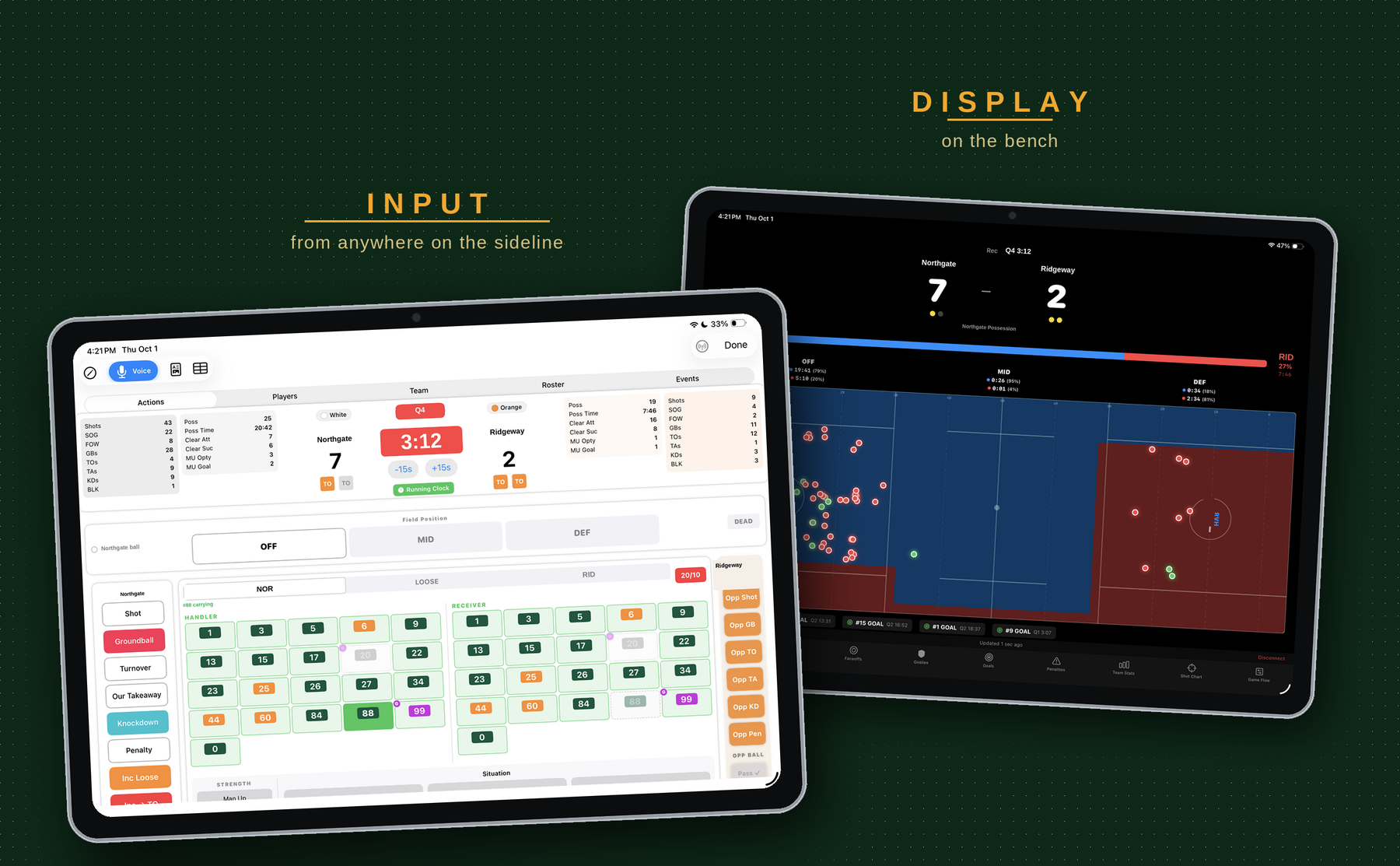
Track the game as it happens, then watch both teams compared on every metric that matters — possession time, turnovers, clears, shooting — live, while you can still change something.
assets/lacrosse-hero.pngTrack
One screen, eight jobs, with your thumbs and your voice.
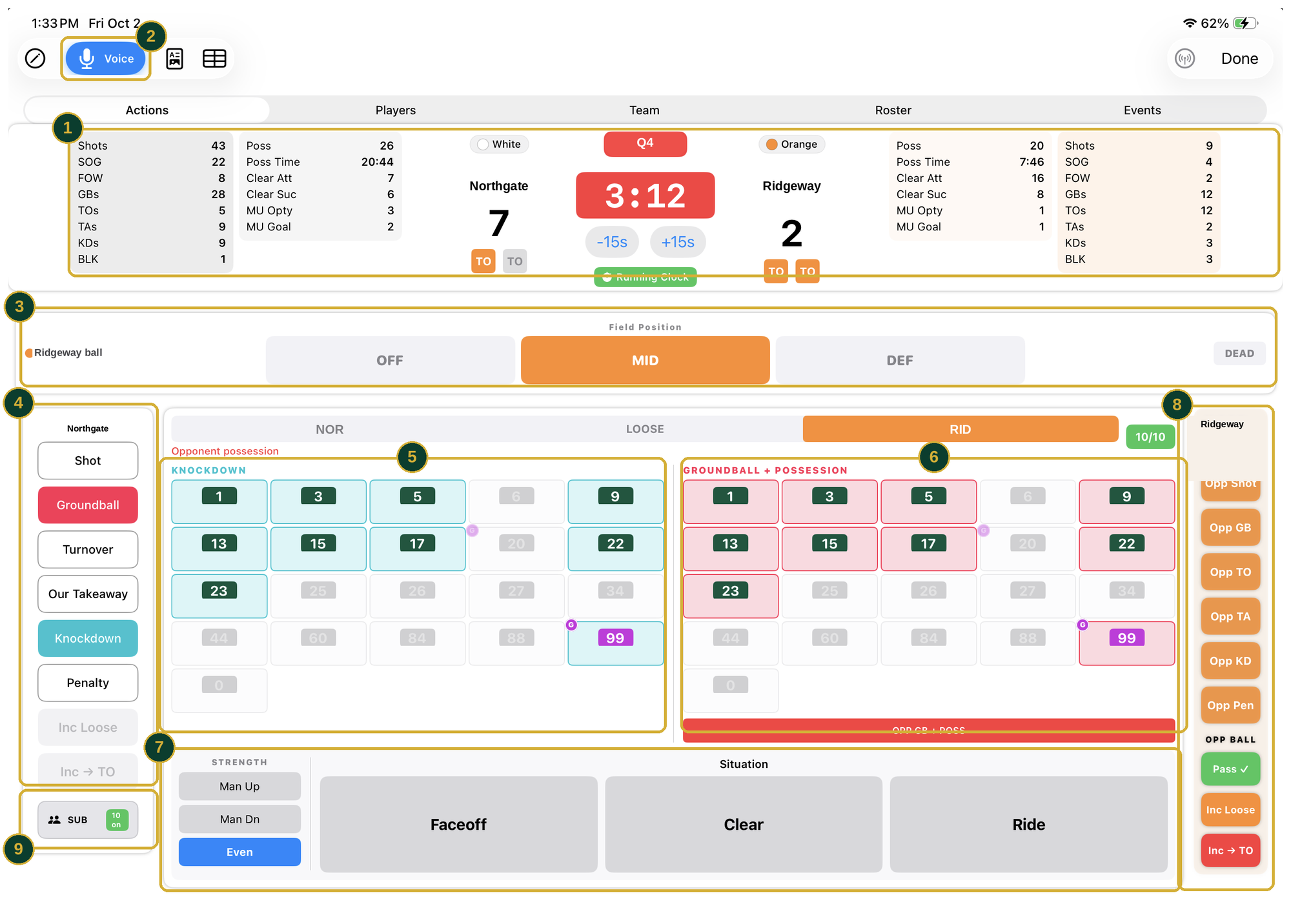
assets/lacrosse-faceoff.png- 1
RUNNING TOTALS
Shots, shots on goal, face-off wins, ground balls, takeaways, knockdowns, clears and possession time — both teams, building as you log.
- 2
FIELD POSITION
The row turns orange the moment the other team has it. Possession time accrues to them, in the third of the field they are in.
- 3
ONLY WHAT IS POSSIBLE
With the ball gone, your clear buttons gray themselves out and the defensive ones stay live. The app will not let you log something that cannot happen.
- 4
KNOCKDOWN
Tap the defender who knocked it loose. If your defense then recovers the ground ball, that same player is credited with the takeaway automatically.
- 5
GROUNDBALL + POSSESSION
Who picked it up, and whether it turned into possession — in one tap, with the opponent bar beneath for when they win it back.
- 6
STRENGTH AND SITUATION
Man up, man down or even, and whether the play came off a face-off, a clear or a ride. Every action is stamped with its context, so the reports can give you man-up conversion and clear and ride success rates rather than just totals.
- 7
THEIR BALL, LIVE
Pass, incomplete loose ball and incomplete-to-turnover arm themselves while they carry, ready for the next thing that happens.
- 8
WHO IS ON, AND FOR HOW LONG
Substitute from here and the badge shows how many are on. Because the app knows who was on the field and when, playing time is counted for you rather than estimated after the fact.
Compare
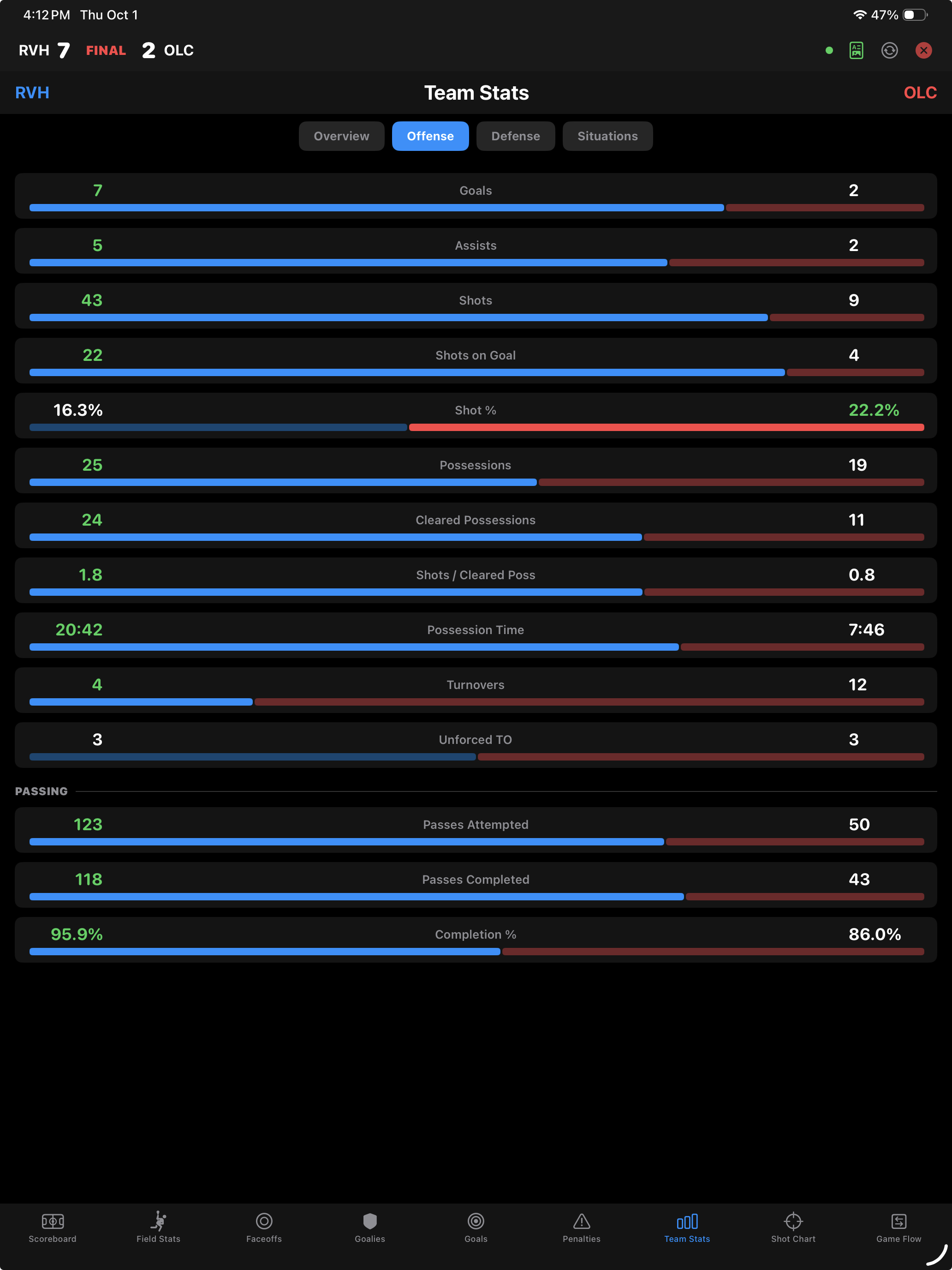
Both teams, every metric, while you can still do something about it.
- Side by side, live. Every metric shows your number and theirs on one row, with a bar that fills to match. You read the gap, not the digits.
- The numbers that decide lacrosse games. Possessions, cleared possessions, possession time, turnovers, shots per cleared possession — alongside goals, assists and shooting percentage.
- Built for the bench. Mirrored to a second iPad so the coach watches the comparison while the person tracking keeps their head down on input.
- Honest, not flattering. The better number is highlighted whichever side it belongs to, so a gap you are losing is as obvious as one you are winning.
assets/lacrosse-compare.pngShots and Saves
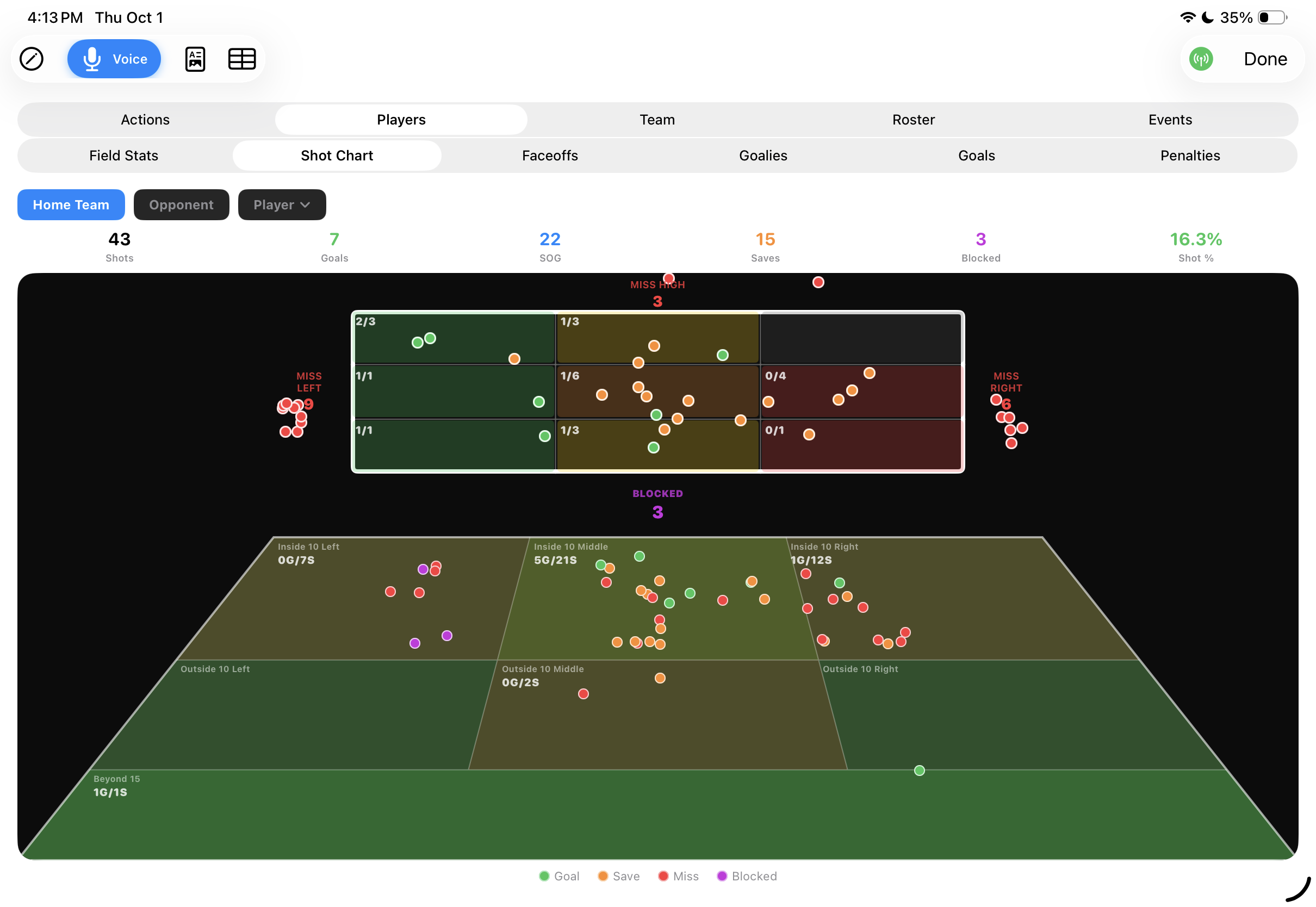
Where they came from, and where in the net they went.
- Two charts, not one. A goal‑mouth grid showing where in the net every shot went, and a field chart showing where it was taken from.
- Zone by zone on the field. Goals over shots for each area — inside ten left, middle, right, outside ten, beyond fifteen.
- Misses counted, not discarded. Wide left, wide right, high and blocked are tallied outside the frame, because a shooter who keeps missing left is a coaching problem.
- Goalie saves in the same picture. Saves sit on the same chart as goals and misses, so you can see what your keeper is actually facing.
- Filter it down. By team or by a single player.
assets/lacrosse-heatmap.pngReports and Season
One game, then twenty.
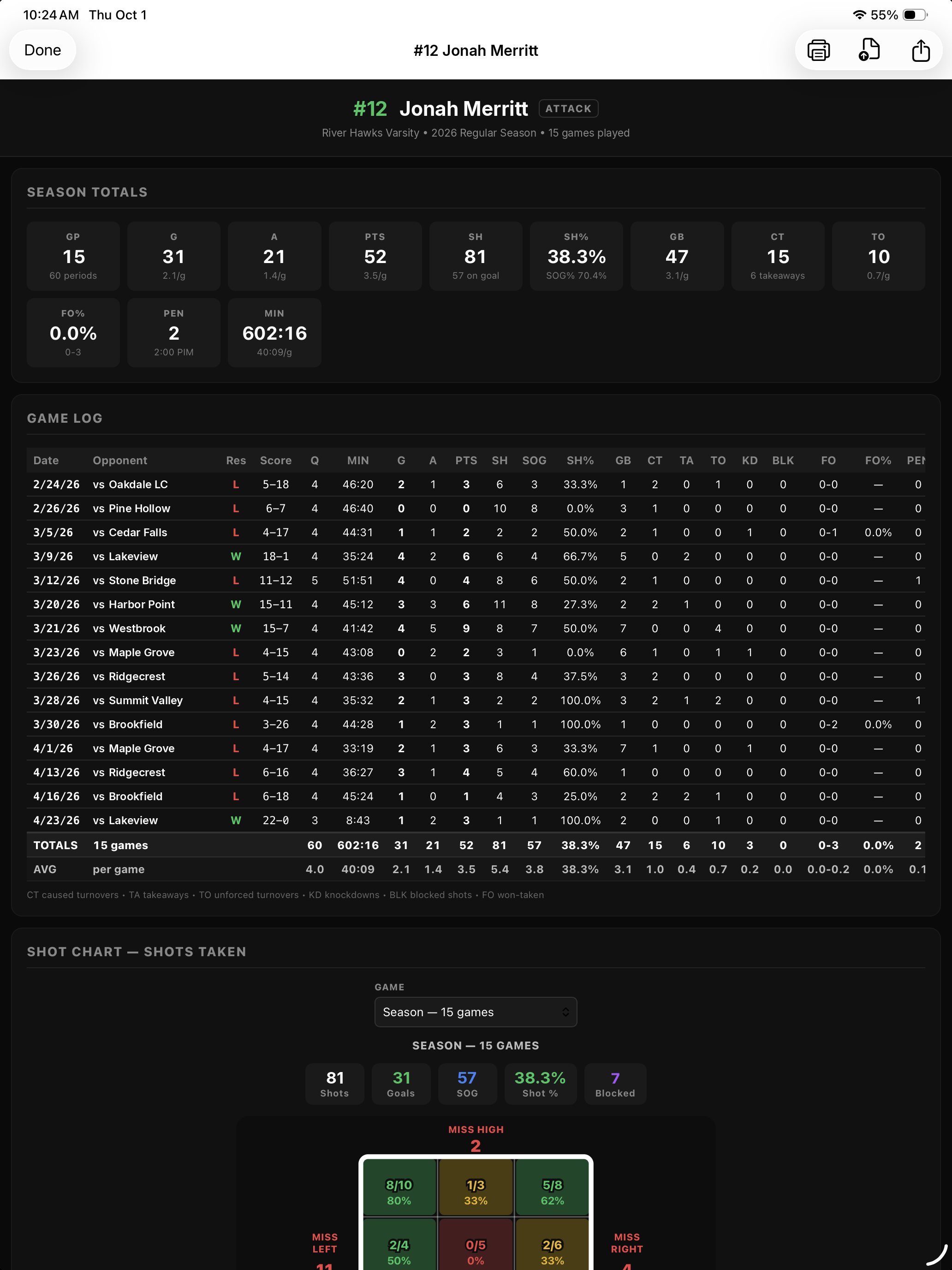
- Everything in one report. Face‑off rates, shot locations, ground balls, saves and time of possession together rather than scattered.
- HTML or CSV. A readable report to hand out, or the raw numbers for your own analysis.
- Season rollups. Each game folds into season totals and averages without re‑entering anything.
- Player reports. A page per player — the handout for a parent meeting and the evidence in a playing‑time conversation.
- Nothing leaves until you send it. Roster and game data stay on the iPad until you share them.
assets/lacrosse-report.pngA lacrosse app that counts lacrosse things.
Face‑offs, ground balls, clears and time of possession are the spine of a lacrosse game, and most stat apps treat them as afterthoughts. Coaches Box Lacrosse is built around them. Download it and track your next game.